Authentication
Introduction
Django Ninja provides several tools to help you handle authentication and authorization easily, quickly, and in a standard way, without having to study and learn all the security specifications.
The core idea is that when you describe an API operation, you can define an authentication object.
from ninja import NinjaAPI
from ninja.security import django_auth

api = NinjaAPI(csrf=True)


@api.get("/pets", auth=django_auth)
def pets(request):
    return f"Authenticated user {request.auth}"
In this example, the client will only be able to call the pets method if it uses Django session authentication (which is cookie-based by default), otherwise an HTTP-401 error will be returned.
If you only want to authorize superusers, you can use from ninja.security import django_auth_superuser instead.
Automatic OpenAPI schema
Here is an example where the client needs to pass a header in order to authenticate:
Authorization: Bearer supersecret
from ninja.security import HttpBearer


class AuthBearer(HttpBearer):
    def authenticate(self, request, token):
        if token == "supersecret":
            return token


@api.get("/bearer", auth=AuthBearer())
def bearer(request):
    return {"token": request.auth}
Now go to the http://localhost:8000/api/docs documentation.
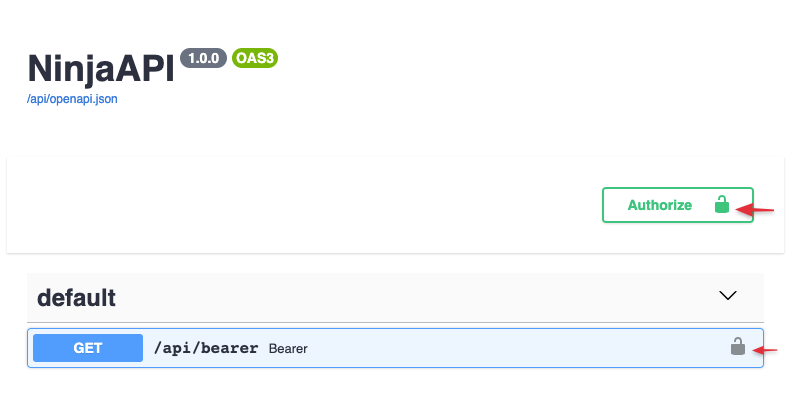
Now, when you click the Authorize button, you will be prompted to enter your authentication token.
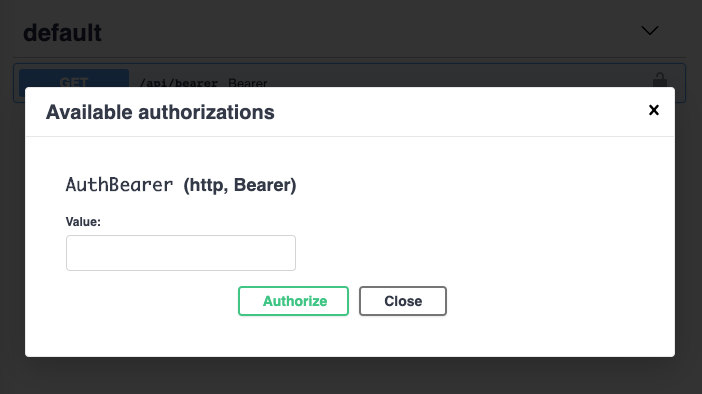
When you make a test call, every request will pass the authorization header.
Global authentication
If you need to protect all of your API's methods, you can pass the auth argument to the NinjaAPI constructor:
from ninja import NinjaAPI, Form
from ninja.security import HttpBearer


class GlobalAuth(HttpBearer):
    def authenticate(self, request, token):
        if token == "supersecret":
            return token


api = NinjaAPI(auth=GlobalAuth())

# @api.get(...)
# def ...

# @api.post(...)
# def ...
And, if you need to override some of the methods, you can do it again at the operation level by passing the auth argument. In this example, authentication will be disabled for the /token operation:
from ninja import NinjaAPI, Form
from ninja.security import HttpBearer


class GlobalAuth(HttpBearer):
    def authenticate(self, request, token):
        if token == "supersecret":
            return token


api = NinjaAPI(auth=GlobalAuth())

# @api.get(...)
# def ...
# @api.post(...)
# def ...


@api.post("/token", auth=None)  # < overriding global auth
def get_token(request, username: str = Form(...), password: str = Form(...)):
    if username == "admin" and password == "giraffethinnknslong":
        return {"token": "supersecret"}
Available authentication options
Custom function
The "auth=" argument accepts any callable. NinjaAPI will only pass authentication when the callable returns a value that is truthy (converts to a boolean True). This return value will be assigned to the request.auth attribute.
def ip_whitelist(request):
    if request.META["REMOTE_ADDR"] == "8.8.8.8":
        return "8.8.8.8"


@api.get("/ipwhitelist", auth=ip_whitelist)
def ipwhitelist(request):
    return f"Authenticated client, IP = {request.auth}"
API keys
Some APIs use API keys for authorization. An API key is a token that a client provides when making an API call to identify itself. The key can be sent in the query string:
GET /something?api_key=abcdef12345
Or as a request header:
GET /something HTTP/1.1
X-API-Key: abcdef12345
Or as a cookie:
GET /something HTTP/1.1
Cookie: X-API-KEY=abcdef12345
Django Ninja comes with built-in classes to help you handle these situations.
In Query
from ninja.security import APIKeyQuery
from someapp.models import Client


class ApiKey(APIKeyQuery):
    param_name = "api_key"

    def authenticate(self, request, key):
        try:
            return Client.objects.get(key=key)
        except Client.DoesNotExist:
            pass


api_key = ApiKey()


@api.get("/apikey", auth=api_key)
def apikey(request):
    assert isinstance(request.auth, Client)
    return f"Hello {request.auth}"
In this example, we get a token from GET['api_key'] and find the corresponding Client in the database. The Client instance will be set as the request.auth attribute.
Note: param_name is the name of the GET parameter that will be checked. If not set, the default "key" is used.
In Header
from ninja.security import APIKeyHeader


class ApiKey(APIKeyHeader):
    param_name = "X-API-Key"

    def authenticate(self, request, key):
        if key == "supersecret":
            return key


header_key = ApiKey()


@api.get("/headerkey", auth=header_key)
def apikey(request):
    return f"Token = {request.auth}"
In Cookie
from ninja.security import APIKeyCookie


class CookieKey(APIKeyCookie):
    def authenticate(self, request, key):
        if key == "supersecret":
            return key


cookie_key = CookieKey()


@api.get("/cookiekey", auth=cookie_key)
def apikey(request):
    return f"Token = {request.auth}"
HTTP Bearer
from ninja.security import HttpBearer


class AuthBearer(HttpBearer):
    def authenticate(self, request, token):
        if token == "supersecret":
            return token


@api.get("/bearer", auth=AuthBearer())
def bearer(request):
    return {"token": request.auth}
HTTP Basic authentication
from ninja.security import HttpBasicAuth


class BasicAuth(HttpBasicAuth):
    def authenticate(self, request, username, password):
        if username == "admin" and password == "secret":
            return username


@api.get("/basic", auth=BasicAuth())
def basic(request):
    return {"httpuser": request.auth}
Multiple authenticators
The auth argument also allows you to pass multiple authenticators:
from ninja.security import APIKeyQuery, APIKeyHeader


class AuthCheck:
    def authenticate(self, request, key):
        if key == "supersecret":
            return key


class QueryKey(AuthCheck, APIKeyQuery):
    pass


class HeaderKey(AuthCheck, APIKeyHeader):
    pass


@api.get("/multiple", auth=[QueryKey(), HeaderKey()])
def multiple(request):
    return f"Token = {request.auth}"
In this case, Django Ninja will first check the API key from GET, and if it is not set or invalid, it will check the header key.
If both are invalid, it will raise an authentication error to the response.
Router authentication
Use the auth argument on a router to apply an authenticator to all operations declared within it:
api.add_router("/events/", events_router, auth=BasicAuth())
Or using the router constructor
router = Router(auth=BasicAuth())
Custom exceptions
Raising an exception that has an exception handler will return that handler's response in the same way as an operation:
from ninja import NinjaAPI
from ninja.security import HttpBearer

api = NinjaAPI()

class InvalidToken(Exception):
    pass

@api.exception_handler(InvalidToken)
def on_invalid_token(request, exc):
    return api.create_response(request, {"detail": "Invalid token supplied"}, status=401)

class AuthBearer(HttpBearer):
    def authenticate(self, request, token):
        if token == "supersecret":
            return token
        raise InvalidToken


@api.get("/bearer", auth=AuthBearer())
def bearer(request):
    return {"token": request.auth}
Async authentication
Django Ninja has basic support for asynchronous authentication. While the default authentication classes are not async-compatible, you can still define your custom async authentication callable and pass it with auth.
async def async_auth(request):
    ...


@api.get("/pets", auth=async_auth)
def pets(request):
    ...
For more information, see Error handling .
Success
Continue to the next section Testing

Comments
本文总阅读量次