Ninja JWT Custom Token Claims
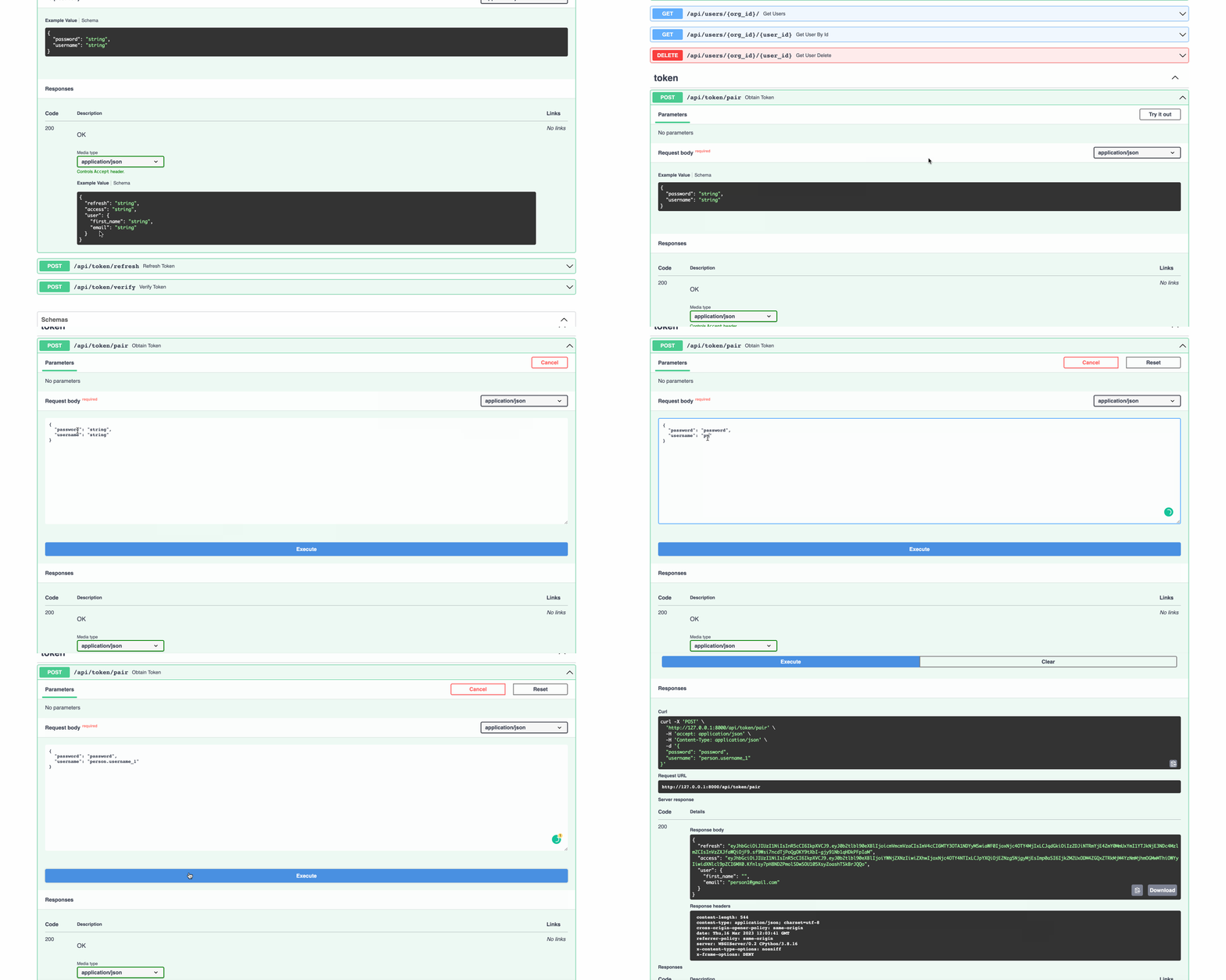
If you wish to customize the claims included in the web tokens generated by the NinjaJWTDefaultController and NinjaJWTSlidingController
views, create a subclass for the desired controller along with its corresponding serializer. Here is an example:
Info
If you are interested in the asynchronous version of the class, use AsyncNinjaJWTDefaultController and AsyncNinjaJWTSlidingController.
Also note that it only works with Django versions that support asynchronous operations.
from ninja_jwt.schema import TokenObtainPairInputSchema
from ninja_jwt.controller import TokenObtainPairController
from ninja_extra import api_controller, route
from ninja import Schema


class UserSchema(Schema):
    first_name: str
    email: str


class MyTokenObtainPairOutSchema(Schema):
    refresh: str
    access: str
    user: UserSchema


class MyTokenObtainPairSchema(TokenObtainPairInputSchema):
    def output_schema(self):
        out_dict = self.get_response_schema_init_kwargs()
        out_dict.update(user=UserSchema.from_orm(self._user))
        return MyTokenObtainPairOutSchema(**out_dict)


@api_controller('/token', tags=['Auth'])
class MyTokenObtainPairController(TokenObtainPairController):
    @route.post(
        "/pair", response=MyTokenObtainPairOutSchema, url_name="token_obtain_pair"
    )
    def obtain_token(self, user_token: MyTokenObtainPairSchema):
        return user_token.output_schema()
As with the standard controller, you also need to register the controller as shown in Getting Started
Using Django Ninja Router
If you are interested in using functions rather than classes, that is also possible. Here is an example
from ninja_jwt.routers.blacklist import blacklist_router
from ninja_jwt.routers.obtain import obtain_pair_router, sliding_router
from ninja_jwt.routers.verify import verify_router
Register the router to django-ninja's api like this:
from ninja import NinjaAPI

api = NinjaAPI()
api.add_router('/token', tags=['Auth'], router=obtain_pair_router)
...
If you are interested in customizing token claims, you can do so by creating subclasses of TokenObtainPairInputSchema and TokenObtainPairController. See Controller Schema Swapping
Additionally, it is important to note that NinjaExtra registers a handler for the APIException class that is not available in NinjaAPI instances.
To work around this, you need the following extra code:
from ninja import NinjaAPI
from ninja_extra import exceptions

api = NinjaAPI()
api.add_router('', tags=['Auth'], router=router)

def api_exception_handler(request, exc):
    headers = {}

    if isinstance(exc.detail, (list, dict)):
        data = exc.detail
    else:
        data = {"detail": exc.detail}

    response = api.create_response(request, data, status=exc.status_code)
    for k, v in headers.items():
        response.setdefault(k, v)

    return response

api.exception_handler(exceptions.APIException)(api_exception_handler)
Controller Schema Swapping
You can now swap controller schemas in the NINJA_JWT settings without inheriting or overriding Ninja JWT controller functionality.
All controller input schemas must inherit from ninja_jwt.schema.InputSchemaMixin, and schemas that generate tokens should inherit from
ninja_jwt.schema.TokenObtainInputSchemaBase or ninja_jwt.schema.TokenInputSchemaMixin if you want more control.
Using the example above:
# project/schema.py
from typing import Type, Dict
from ninja_jwt.schema import TokenObtainInputSchemaBase
from ninja import Schema
from ninja_jwt.tokens import RefreshToken

class UserSchema(Schema):
    first_name: str
    email: str


class MyTokenObtainPairOutSchema(Schema):
    refresh: str
    access: str
    user: UserSchema


class MyTokenObtainPairInputSchema(TokenObtainInputSchemaBase):
    @classmethod
    def get_response_schema(cls) -> Type[Schema]:
        return MyTokenObtainPairOutSchema

    @classmethod
    def get_token(cls, user) -> Dict:
        values = {}
        refresh = RefreshToken.for_user(user)
        values["refresh"] = str(refresh)
        values["access"] = str(refresh.access_token)
        values.update(user=UserSchema.from_orm(user)) # this will be needed when creating output schema
        return values
In MyTokenObtainPairInputSchema we override the get_token method to define our token as well as some data needed by the output schema.
We also override the get_response_schema method to define our output schema MyTokenObtainPairOutSchema.
Next, we apply the MyTokenObtainPairInputSchema schema to the controller. This can be done simply in the NINJA_JWT settings.
# project/settings.py

NINJA_JWT = {
    'TOKEN_OBTAIN_PAIR_INPUT_SCHEMA': 'project.schema.MyTokenObtainPairInputSchema',
}
# project/settings.py

NINJA_JWT = {
    # FOR OBTAIN PAIR
    'TOKEN_OBTAIN_PAIR_INPUT_SCHEMA': "project.schema.MyTokenObtainPairInputSchema",
    'TOKEN_OBTAIN_PAIR_REFRESH_INPUT_SCHEMA': "for.obtain_pair.refresh_input.schema",
    # FOR SLIDING TOKEN
    'TOKEN_OBTAIN_SLIDING_INPUT_SCHEMA':  "for.obtain_sliding.input.schema",
    'TOKEN_OBTAIN_SLIDING_REFRESH_INPUT_SCHEMA': "for.obtain_pair.refresh_input.schema",

    'TOKEN_BLACKLIST_INPUT_SCHEMA':  "for.blacklist_input.schema",
    'TOKEN_VERIFY_INPUT_SCHEMA':  "for.verify_input.schema",
}
Note
Controller Schema Swapping is only available in v5.2.4 and above
Success
Continue to the next chapter Creating Tokens Manually.

本文总阅读量次