
Django Ninja is a web framework for building APIs with Django and Python 3.6+ type hints.
Main features:
- Easy to understand: Designed to be easy to use and intuitive.
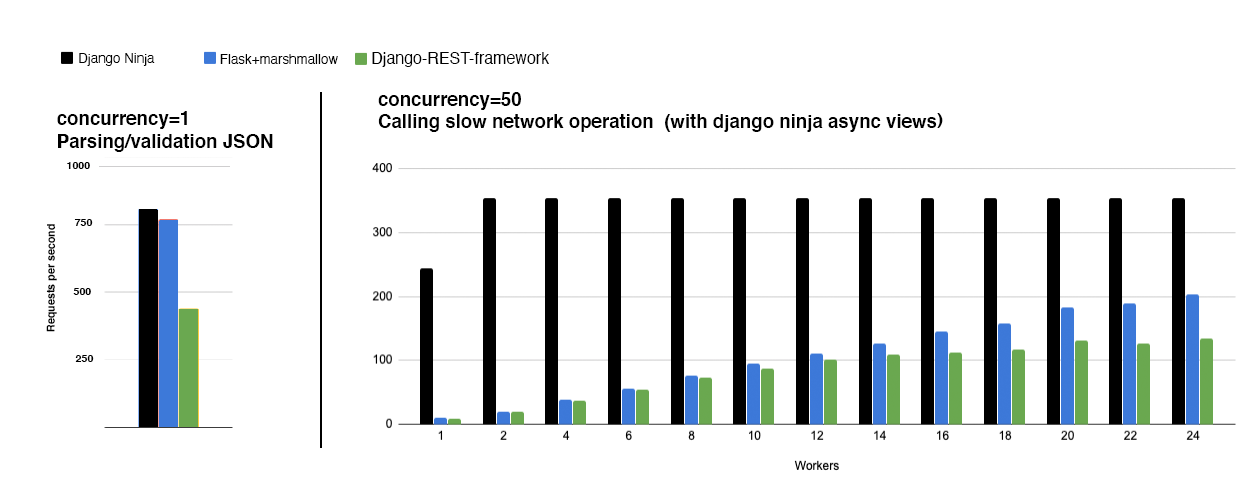
- Fast execution: Thanks to Pydantic and async support, it has very high performance.
- Fast to code: Django Ninja is a web framework for building APIs with Django and Python 3.6+ type hints.
- Standards-based: Based on standards: OpenAPI (formerly Swagger) and JSON Schema.
- Django friendly: (obviously) integrates well with Django core and the ORM.
- Production ready: Used by multiple companies in real projects (if you use Django Ninja and want to publish your feedback, please email ppr.vitaly@gmail.com).
Installation
pip install django-ninja
Quick example
Start a new Django project (or use an existing one)
django-admin startproject apidemo
In urls.py
from django.contrib import admin
from django.urls import path
from ninja import NinjaAPI

api = NinjaAPI()


@api.get("/add")
def add(request, a: int, b: int):
    return {"result": a + b}


urlpatterns = [
    path("admin/", admin.site.urls),
    path("api/", api.urls),
]
Now, run it as usual:
./manage.py runserver
Note: you don't have to add Django Ninja to your installed apps for it to work.
Check it
Open your browser at http://127.0.0.1:8000/api/add?a=1&b=2
You will see the JSON response as:
{"result": 3}
- Receives an HTTP GET request at
/api/add - Receives, validates, and type-converts GET parameters
aandb - Decodes the result as JSON
- Generates an OpenAPI schema for the defined operation
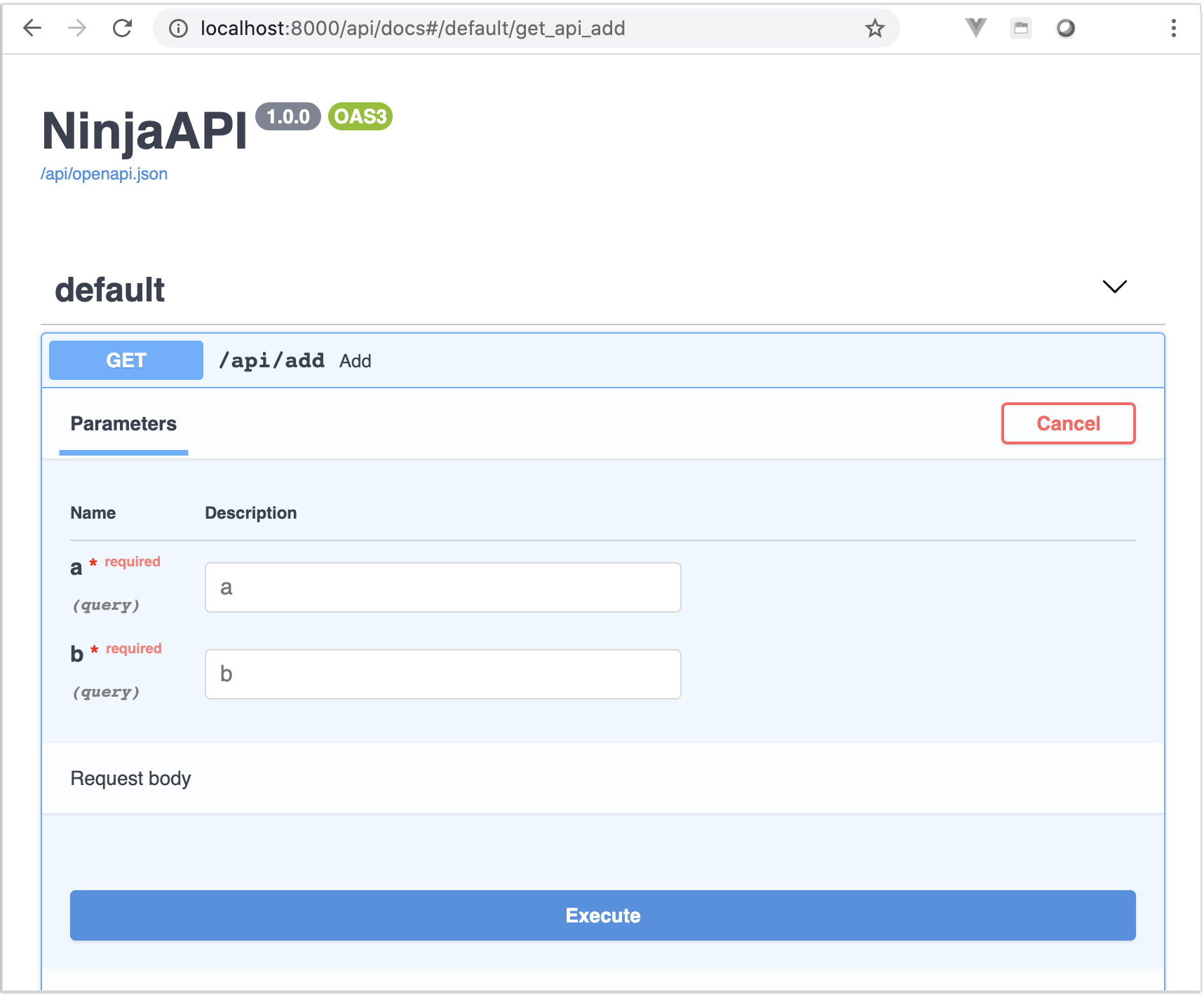
Interactive API documentation
Now go to http://127.0.0.1:8000/api/docs
You will see the automatic, interactive API documentation (provided by OpenAPI / Swagger UI or Redoc) :
Summary
In short, you only declare the types of parameters, request bodies, etc. once, as function arguments.
You do this with standard, modern Python types.
You don't have to learn a new syntax, the methods or classes of a specific library, etc.
Just standard Python 3.6+.
For example, for an int:
a: int
Or, for a more complex Item model:
class Item(Schema):
    foo: str
    bar: float

def operation(a: Item):
    ...
...with just this one declaration, you get:
- Editor support, including:
- Autocompletion
- Type checking
- Data validation:
- Automatic and clear errors when data is invalid
- Validation even for deeply nested JSON objects
- Serialization of network input data and conversion to Python data output, and reading from:
- JSON
- Path parameters
- Query parameters
- Cookies
- Headers
- Forms
- Files
- Automatic, interactive API documentation
This project was heavily inspired by FastAPI.
Note
Check out the Tutorial to get started quickly.
Ecosystem around Django Ninja:
-
django-ninja: A framework based on Django that takes the best of Django and pairs it with the power of Pydantic — the optimal choice at the intersection of security and convenience.
-
django-ninja-crud: A framework built on django-ninja to simplify CRUD interface development, providing declarative model viewsets and scenario-based testing methods.
-
django-ninja-extra: A tool that lets developers skip verbose Django documentation and quickly build powerful web applications and modern API interfaces with minimal code.
-
django-ninja-jwt: A JSON Web Token plugin for django-ninja that implements authentication and related features, forked from a popular Django Rest Framework plugin.
本文总阅读量次